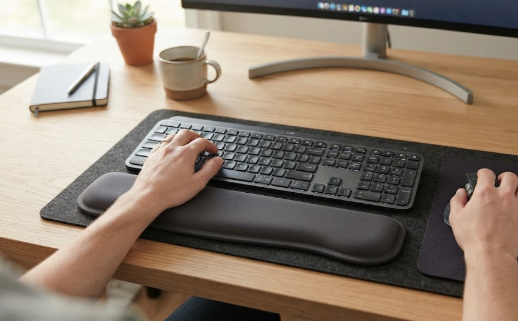
Wrist and forearm strain is one of the most common complaints among people who spend all day at a keyboard, and it does not stay in the wrist: awkward hand positioning ripples up the arm into the shoulders and upper back, feeding the same tension that makes desk work uncomfortable. A good wrist rest is a small, inexpensive way to support your hands and encourage a more neutral posture. But there is a crucial catch that the name itself gets wrong, and understanding it is the difference between a wrist rest that helps and one that quietly makes things worse.
This guide covers the best wrist rests for keyboard and mouse in 2026, explains how to use one correctly, and helps you choose the right type. It works hand in hand with our guide to the best ergonomic keyboard and mouse, since the peripheral and the rest together shape your hand posture.
The most important thing: how to use a wrist rest correctly
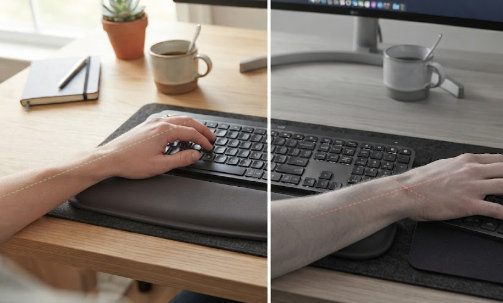
Despite the name, you should not plant and press your wrist into a wrist rest while you are actively typing or mousing. The underside of your wrist is exactly where the carpal tunnel sits, and resting your body weight there compresses it, which is the very thing that causes the pain in the first place. Used that way, a wrist rest can worsen strain rather than relieve it. The correct approach is twofold: a wrist rest should support the heel of your palm rather than your wrist, and it is mainly for resting your hands during pauses, not for anchoring them while you type. While actively typing, keep your wrists straight and floating, with your forearms resting on the desk so your hands do not hang from your wrists. Think of the rest as a place to relax your palms between bursts of work, and you get the benefit without the risk.
What to look for in a wrist rest
Start with type. Cushioned memory-foam or gel rests are the classic choice for keyboards, molding to your hands and adding comfort during pauses, while gliding rests, which sit under the heel of your hand and slide with the mouse on low-friction feet, are designed specifically for mouse use and reduce the wrist twisting of a static pad. Match the height to your keyboard, because mechanical keyboards sit taller and need a taller rest or a low-profile board to keep your wrist neutral rather than cocked upward. If you use the number pad, choose a full-length keyboard rest so your right hand is supported too. Beyond that, look for a non-slip base so it stays put, a cover that is comfortable against the skin and easy to clean, and, for gliding rests, the right size for your hand so your wrist sits at a neutral angle.
The best wrist rests for keyboard and mouse in 2026
DeltaHub Carpio 2.0 — Best for mouse use
The DeltaHub Carpio 2.0 rethinks the mouse wrist rest, and it was developed over years with input from a carpal tunnel surgeon. Rather than a static pad you press into, it lifts the heel of your hand about a centimetre and shifts the pressure onto the tougher part of your palm, away from the carpal tunnel, then glides with your hand on low-friction feet so your whole arm moves naturally instead of pivoting from the wrist. That combination directly targets the two things that make mousing hurt. It is the standout for anyone whose strain centres on mouse use. See it on the official DeltaHub site.
Memory Foam Combo — Best overall combo
For a matched keyboard-and-mouse set, the HandStands combo is a repeated top pick in hands-on testing for its comfortable memory foam and solid construction. It supports both peripherals for consistent hand positioning across your desk and holds up well over time. It is worth noting the keyboard rest does not stretch the full length of a keyboard with a number pad, and the mouse rest is fairly plush, but for most users it is an excellent, affordable way to add comfort to both hands at once.
BRILA Memory Foam Set — Best for full-size keyboards
If you regularly use the number pad, the BRILA keyboard and mouse wrist rest is designed to cover the full length of a standard keyboard, so your whole hand is supported rather than just the main key area. It combines memory foam with a breathable fabric cover for comfort during long sessions. For people with full-size keyboards who found shorter rests awkward, it solves the coverage problem while keeping the cushioned feel most typists prefer.
Gimars or Gorilla Grip Memory Foam Set — Best budget
For an inexpensive, no-fuss option, popular memory-foam sets from brands like Gimars and Gorilla Grip deliver soft, supportive cushioning for both keyboard and mouse at a very low price, usually with a non-slip base and a stain-resistant cover. They will not offer the specialised design of a gliding rest, but as a cheap, comfortable way to support your palms during pauses, they are a sensible entry point and among the best-selling wrist rests going.
Razer Ergonomic Wrist Rest — Best for mechanical and gaming keyboards
The Razer ergonomic wrist rest scores highly on comfort thanks to its angled, inclined profile, which suits the taller height of mechanical and gaming keyboards and helps keep the wrist from cocking upward. Its firmer cushioning and anti-slip rubber base feel premium and stay planted during fast movements. For anyone with a full-sized mechanical keyboard who wants a rest matched to that height, it is the comfortable, well-built choice.
At-a-glance comparison
The table below summarises the picks above. Prices are approximate United States figures and can change, so always confirm current pricing before buying.
| Wrist rest | Best for | Type | Approx. price |
|---|---|---|---|
| DeltaHub Carpio 2.0 | Mouse use | Gliding, surgeon-designed | ~$35 – $45 |
| HandStands Combo | Overall combo | Memory foam set | ~$15 – $25 |
| BRILA Memory Foam Set | Full-size keyboards | Full-length memory foam | ~$15 – $20 |
| Gimars / Gorilla Grip | Budget | Memory foam set | ~$10 – $20 |
| Razer Ergonomic | Mechanical keyboards | Angled firm cushion | ~$20 – $30 |
The bigger picture for wrist and hand health
A wrist rest is a helpful accessory, but it is a small piece of the puzzle and not a cure for carpal tunnel syndrome or repetitive strain injury. The larger levers are keeping your wrists neutral, using an ergonomic keyboard and mouse, and getting your desk and chair heights right so you are not reaching or raising your shoulders. Position your mouse at elbow height and keep it close so you are not stretching sideways, and take a short break every twenty to thirty minutes to flex and relax your hands. If your desk forces your shoulders up to reach it, the fix may actually be raising your chair and adding a footrest, as our best office footrests guide explains. And because wrist position affects your whole posture chain up into the shoulders and back, it is worth getting the rest of your setup right too, which our home office ergonomic setup guide covers. If you type on a raised laptop, remember to add a separate keyboard, as noted in our best laptop stands guide.
Frequently asked questions
Do wrist rests actually help, or do they cause carpal tunnel?
Used correctly, they can help with comfort and posture; used incorrectly, they can contribute to strain. The key is not to press your wrist into the rest while typing, since that compresses the carpal tunnel, but instead to support the heel of your palm and use the rest mainly during pauses, keeping your wrists straight and floating while you type. Follow that approach and a wrist rest is a low-risk, helpful accessory rather than a cause of problems.
Are gel or memory foam wrist rests better?
Both work well and the choice is largely personal. Memory foam molds to your hands and feels cushioned, while gel conforms to your shape and can feel a little cooler and firmer. More important than the material is using the rest correctly and matching its height to your keyboard so your wrist stays neutral. For mouse use specifically, a gliding rest that moves with your hand is often better than either.
Do I need a wrist rest if I have an ergonomic keyboard?
Not necessarily. Many ergonomic keyboards already include an integrated palm rest or a low-profile design that keeps the wrist neutral, which reduces the need for a separate rest. If yours does not, or if you want extra comfort during pauses, a wrist rest can complement it. The priority is neutral wrist posture however you achieve it, not owning a wrist rest for its own sake.
Can a wrist rest fix my wrist pain?
It can improve comfort and support better posture, but it will not cure an underlying condition such as carpal tunnel syndrome or RSI, and it is only one part of a good setup. If you have persistent wrist pain, numbness, or tingling, that is a sign to review your whole ergonomic setup and to consult a healthcare professional, since those symptoms need proper assessment rather than an accessory alone.
The bottom line
A wrist rest is a cheap, useful addition to an ergonomic workstation, as long as you use it the right way: to support your palms during pauses, not to press your wrists into while typing. The DeltaHub Carpio 2.0 is the standout for mouse use, the HandStands combo is the best all-round set, and budget memory-foam sets cover the basics well. Match the height to your keyboard, keep your wrists neutral, take regular breaks, and treat the rest as one part of a setup that includes a good keyboard, mouse, chair, and desk. To choose the peripherals it pairs with, see our guide to the best ergonomic keyboard and mouse.
Affiliate disclosure: This article contains affiliate links. If you buy a product through one of them, we may earn a small commission at no extra cost to you. This never influences which products we recommend.
Medical disclaimer: We are not doctors or physiotherapists, and this article is for general informational purposes only. It is not medical advice, diagnosis, or treatment. A wrist rest is a comfort accessory, not a treatment for carpal tunnel syndrome or repetitive strain injury. If you have persistent wrist or hand pain, numbness, tingling, or weakness, please consult a qualified healthcare professional.