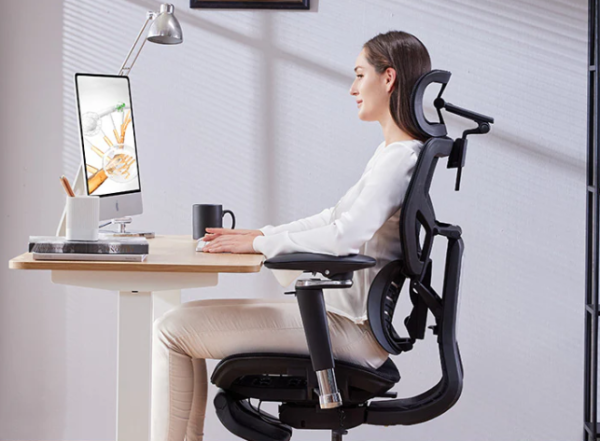
If you spend eight, nine, or ten hours a day in front of a screen, your chair is no longer just furniture. It is the single piece of equipment your spine relies on most. After the shift to remote and hybrid work, millions of people are sitting longer than ever, often on dining chairs or worn-out seats that offer no real lumbar support. The result has been a sharp rise in lower-back stiffness, neck tension, and the kind of dull, persistent ache that follows you long after the workday ends.
The good news is that a properly designed ergonomic chair can make a meaningful difference. It will not “cure” back pain on its own, but the right seat encourages a neutral posture, takes pressure off your lower spine, and makes it far easier to sit well for hours without thinking about it. In this guide we walk through the best ergonomic chairs for back pain in 2026, from premium investment pieces to budget options under $350, and we explain exactly what to look for so you can choose with confidence.
How we chose these chairs
Rather than ranking chairs by brand name or marketing, we focused on the features that physiotherapists and ergonomics specialists consistently point to as important for back health: adjustable lumbar support, seat height and depth adjustment, a backrest that reclines and supports the natural curve of the spine, and armrests that take load off the shoulders and neck. We weighed each model’s build quality, warranty length, and value for money, and we cross-referenced manufacturer specifications with long-term owner feedback from communities such as Reddit’s r/OfficeChairs and independent review labs that test seating for posture support. Prices listed are approximate United States figures at the time of writing and can change, so always confirm the current price before buying.
What makes a chair good for back pain
Before looking at specific models, it helps to understand why some chairs protect your back and others quietly damage it. The most important factor is lumbar support: a good chair fills the gap behind your lower spine so the natural inward curve is maintained instead of slumping into a C-shape. The best chairs let you adjust both the height and the depth of that support, because everyone’s spine sits differently.
Seat height and depth matter almost as much. Your feet should rest flat on the floor with your knees at roughly a right angle, and there should be a small gap between the front edge of the seat and the back of your knees so circulation is not restricted. A backrest that reclines and, ideally, follows your movement keeps your spine active rather than locked in one position all day, while adjustable armrests support your forearms so your shoulders and neck are not carrying the weight of your arms for hours. Finally, breathable materials such as suspension mesh or high-density foam keep you comfortable during long sessions, which indirectly helps because the more comfortable you are, the less you fidget into bad postures.
The best ergonomic chairs for back pain in 2026
Steelcase Leap V2 — Best overall for back pain
For most people dealing with genuine, recurring back pain, the Steelcase Leap V2 is the chair we recommend first. Its standout feature is the LiveBack system, a flexible backrest that changes shape to mirror your spine as you move, combined with one of the most effective adjustable lumbar mechanisms on the market. You can fine-tune lower-back firmness independently, which is exactly what people with lumbar issues need. The Leap V2 also offers a wide range of seat depth, height, and 4D armrest adjustment, so it fits a broad range of body types. Bought new it typically sits in the higher price bracket, but it is one of the few chairs genuinely worth buying refurbished, where certified-remanufactured units often appear at roughly half the new price with the warranty intact. If you want maximum back support for the money, this is the smart starting point.
Herman Miller Aeron — Best premium chair and long-term investment
The Herman Miller Aeron remains the gold standard of ergonomic seating in 2026, and for good reason. Its 8Z Pellicle suspension mesh distributes your weight evenly and breathes exceptionally well, while the PostureFit SL lumbar system supports both the lower spine and the area just above the pelvis, which is where a lot of sitting strain originates. The Aeron guides you into an upright, structured posture almost automatically, requiring less fiddling than many rivals. It comes in three sizes so you can match it to your frame, and Herman Miller backs it with a 12-year warranty, which makes the high price easier to justify over a decade of daily use. If budget is not your main constraint and you want a chair you will likely never need to replace, the Aeron is hard to beat.
Herman Miller Embody — Best for posture and dynamic support
Where the Aeron firmly holds you in place, the Herman Miller Embody is built around movement. Its backrest uses a pixelated support system of flexible “ribs” that distribute pressure and flex with even small shifts in your weight, encouraging the gentle, constant micro-movements that keep the spine healthier than rigid stillness. Many long-haul desk users find it the most comfortable chair they have ever owned for marathon sessions, and it supports both back and neck posture with relatively little conscious effort. It sits at a similar premium price to the Aeron, so it is an investment, but for people who want active posture support rather than firm correction, the Embody is the standout choice.
Branch Verve — Best mid-range value
The Branch Verve has become a favourite for people who want a premium feel without a four-figure price tag. Its soft, breathable 3D-knit backrest, adjustable lumbar support, and clean modern design deliver much of the comfort you would expect from chairs costing twice as much. It is comfortable enough for full workdays and stylish enough that it does not look out of place in a living-room home office. While it does not offer the deeply dynamic backrest engineering of the Leap or Embody, it represents one of the best balances of comfort, looks, and price in 2026, making it an easy recommendation for the average remote worker.
Steelcase Series 2 — Best entry point to premium ergonomics
If you want genuine Steelcase build quality but the Leap V2 is out of reach, the Series 2 is an excellent gateway. It brings adjustable lumbar support, a responsive reclining backrest, and the solid construction Steelcase is known for, all at a more accessible price than the brand’s flagship models. It is well suited to anyone working long hours who wants a properly engineered chair that will last years rather than months, and it is a clear step up from the disposable budget chairs that tend to sag and lose support within a year.
Autonomous ErgoChair Pro — Best feature-rich mid-range option
The Autonomous ErgoChair Pro packs a remarkable amount of adjustability into a mid-range price, including adjustable lumbar support, a reclining and lockable backrest, an adjustable headrest, and 4D armrests. For remote workers who like to tweak every setting until the fit is exactly right, it offers premium-style flexibility without the premium cost. It is a particularly strong pick if you are setting up a home office from scratch and want maximum adjustability for your money, especially when paired with one of Autonomous’s height-adjustable desks.
Secretlab Titan Evo — Best for hybrid work and gaming
If your chair pulls double duty for work and gaming, the Secretlab Titan Evo bridges both worlds better than almost any gaming chair. Its integrated 4-way adjustable lumbar support, 4D armrests, and three-size fit system give it more genuine ergonomic engineering than typical racing-style seats, and the firm cold-cure foam holds its shape over years of use. It is best for people who want significant recline and postural variety throughout the day rather than the dynamic, follow-your-spine flex of a dedicated office chair, but for hybrid setups it is a comfortable, well-built choice with a strong reputation among people who sit for very long sessions.
Sihoo Doro C300 — Best budget ergonomic chair
You do not have to spend a fortune to get real ergonomic support, and the Sihoo Doro C300 proves it. With adaptive lumbar support, a breathable mesh back, and a level of adjustability rarely seen at its price, it has earned a strong following among budget-conscious remote workers. It will not match the longevity or refinement of a Steelcase or Herman Miller, but for anyone tired of the cheap-chair replacement cycle who wants legitimate lower-back support without a large outlay, it is one of the best value picks of 2026.
Quick comparison
The table below summarises the picks above so you can match a chair to your budget and needs at a glance. Prices are approximate and shown in US dollars; always check the current price before purchasing.
| Chair | Best for | Lumbar support | Approx. price | Warranty |
|---|---|---|---|---|
| Steelcase Leap V2 | Overall back pain | Adjustable, excellent | $650 (refurb) – $1,100 | Up to 12 yrs |
| Herman Miller Aeron | Premium investment | PostureFit SL | ~$1,800+ | 12 yrs |
| Herman Miller Embody | Posture & movement | Pixelated back system | ~$1,800+ | 12 yrs |
| Branch Verve | Mid-range value | Adjustable | ~$549 | 7 yrs |
| Steelcase Series 2 | Entry premium | Adjustable | ~$469 | Up to 12 yrs |
| Autonomous ErgoChair Pro | Feature-rich mid-range | Adjustable | ~$350 | 2 yrs |
| Secretlab Titan Evo | Hybrid work / gaming | 4-way adjustable | $549 – $669 | 5 yrs |
| Sihoo Doro C300 | Budget | Adaptive | ~$300 – $350 | 3 yrs |
How to set up your chair to actually relieve back pain
Even the best chair will not help if it is poorly adjusted, and this is where many people go wrong. Start by setting the seat height so your feet rest flat on the floor and your thighs are roughly parallel to the ground, with knees at about a 90-degree angle; if your feet dangle, add a footrest. Slide the seat depth so there is a two-to-three-finger gap between the front edge of the seat and the back of your knees. Next, position the lumbar support so it fills the inward curve of your lower back, not your upper back, adjusting both height and firmness until you feel gently supported rather than pushed forward.
Set the armrests so your shoulders stay relaxed and your forearms rest level with your desk, which prevents the shoulder and neck tension that often accompanies lower-back pain. Finally, loosen the recline tension enough that you can lean back slightly and let the chair support you, because a chair that lets you move is healthier than one that locks you bolt upright. Even with a perfect setup, the most important habit is to stand, stretch, and walk for a few minutes every half hour or so. No chair replaces movement.
Frequently asked questions
Can an ergonomic chair fix my back pain?
An ergonomic chair can significantly reduce the strain that long periods of sitting place on your spine, and many people find their discomfort eases once they are properly supported. However, a chair is one part of a bigger picture that also includes regular movement, your overall desk setup, and your general health. It is a tool to support good posture, not a medical treatment, and it cannot diagnose or cure an underlying condition.
Is it worth buying a refurbished chair?
For premium brands such as Steelcase and Herman Miller, certified-refurbished or remanufactured chairs are often outstanding value, frequently costing around half the new price while still carrying a warranty. Because these chairs are built to last well over a decade, a refurbished unit can give you flagship-level back support at a mid-range cost. Just buy from a reputable dealer that inspects and reconditions the chairs rather than an unverified private seller.
Mesh or foam: which is better for back pain?
Both can work well, and the better choice depends on your preference. Suspension mesh, as used in the Aeron, distributes weight evenly and breathes well, which many people find supportive without feeling like they are sinking in. High-density or cold-cure foam, as used in the Leap and the Titan Evo, offers a firmer, more cushioned feel. The key for back health is firm, even support rather than a soft, sofa-like seat that lets your posture collapse.
How much should I spend on a chair for back pain?
You can get a genuinely supportive chair for around $300 to $350, such as the Sihoo Doro C300 or Autonomous ErgoChair Pro, which is enough for most remote workers. Spending more, in the $450 to $700 range, buys better build quality, longer warranties, and more refined adjustment. Above that, premium chairs like the Aeron and Embody are best viewed as long-term investments that you keep for ten years or more.
The bottom line
If we had to choose one chair for the widest range of people fighting back pain, it would be the Steelcase Leap V2, especially bought refurbished, thanks to its outstanding adjustable lumbar support and spine-following backrest at a reachable price. Those who want a lifetime investment should look at the Herman Miller Aeron or Embody, while budget-focused remote workers are well served by the Sihoo Doro C300 or Autonomous ErgoChair Pro. Whichever you choose, remember that the chair is only half the equation: set it up correctly, take regular breaks, and keep moving. Your back will thank you.
Affiliate disclosure: This article contains affiliate links. If you buy a product through one of them, we may earn a small commission at no extra cost to you. This never influences which products we recommend.
Medical disclaimer: We are not doctors or physiotherapists, and this article is for general informational purposes only. It is not medical advice and should not replace consultation with a qualified healthcare professional. If you have persistent, severe, or worsening back pain, please seek advice from a licensed medical provider.