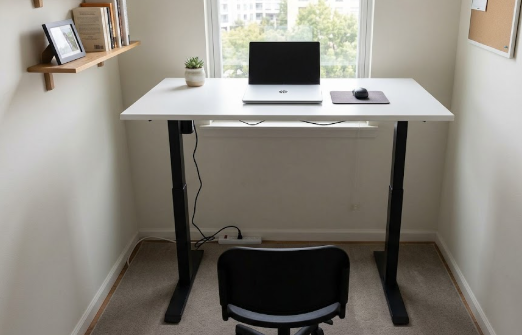
A standing desk used to mean spending $500 or more, but that is no longer true. In 2026 the budget end of the market has matured to the point where you can get a stable, motorised sit-stand desk with a real warranty for under $300. That matters for your back, because the benefit of a standing desk does not come from standing itself; it comes from being able to alternate between sitting and standing easily, which breaks up the long, static sitting that loads your lower spine. You do not need a premium desk to get that benefit, you just need a good one that does not wobble or burn out.
This guide covers the best budget standing desks for back pain in 2026, explains the single spec that matters most at this price, and flags the cheap traps to avoid. If your budget can stretch further, our roundup of the best standing desks for back pain covers the next tier up, and our FlexiSpot vs Uplift comparison pits two leading models against each other.
The one spec that matters most: dual motor
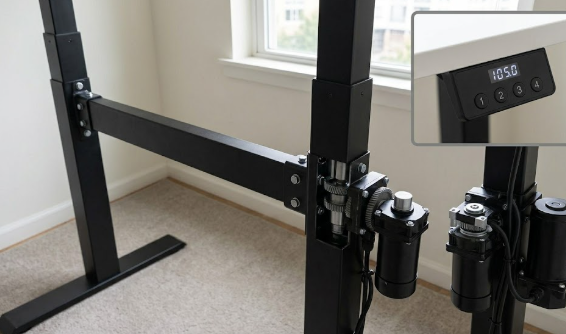
If you remember one thing, make it this: choose a dual-motor desk, not a single-motor one. A dual-motor desk has one motor per leg, which means it lifts evenly, handles more weight, resists racking sideways under a monitor arm, runs quieter, and lasts longer over thousands of cycles. Single-motor desks are usually around eighty dollars cheaper and route power through one motor with a linkage, but they lift more slowly and are less reliable over time. At the budget tier, paying the small premium for dual motors is the difference between a desk you keep and a project desk waiting to be replaced. The good news is that several dual-motor desks now sit comfortably under $300.
What else to look for
After motor count, stability at standing height is the real differentiator, because budget desks are where frame flex shows up, especially above forty-five inches. Look for a crossbar or anti-wobble bracing and a sensible weight capacity, ideally 200 pounds or more if you run dual monitors. Check for memory presets so switching positions is effortless, anti-collision sensing for safety, and decent cable management since the surface moves. A 48-by-24-inch desktop is the standard budget size and fits one monitor comfortably; larger 55- to 60-inch tops cost a little more. One reassuring note: when cheap desks fail, the usual failure is a burned-out motor that simply stops moving, not a collapse, so a dual-motor desk from a reputable brand is a low-risk buy.
The best budget standing desks for back pain in 2026
FlexiSpot E7 Lite (or E5) — Best overall budget desk
FlexiSpot dominates the budget tier, and the E7 Lite is frequently named the best standing desk under $300. It pairs dual motors with a weight capacity around 275 pounds and, crucially, stays stable at full standing height in a price range where most desks wobble. The closely related E5 is another excellent pick, with dual motors, a roughly 220-pound capacity, and a height range wide enough to suit people under five foot four when seated and over six foot when standing. Either is the safe, sensible choice for most people, offering close to mid-range performance for a budget price. See the range on the official FlexiSpot site.
Fezibo Dual Motor 55″ — Best stability
If stability is your top priority, or you plan to mount a heavy monitor arm, the Fezibo dual-motor 55-inch desk is the budget pick to beat. Its heavier legs and better anti-wobble bracing keep it steadier at standing height than most rivals at the same price, and the larger top gives you room for a dual-monitor setup. For anyone who has been burned by a flimsy desk before and wants the most rigid budget option, this is the one engineered for it.
Autonomous SmartDesk Core — Best build quality and brand backing
The Autonomous SmartDesk Core lands right around $300 and delivers solid build quality and a real warranty from a recognised brand, which is reassuring at this price. It offers programmable presets, a quiet motor, and a clean, minimalist look that suits a home office, and it bundles attractively with the brand’s chairs. For buyers who want budget pricing without feeling like they are gambling on an unknown name, it is a dependable choice.
VIVO Electric Stand Up Desk — Best value benchmark
The VIVO electric desk has long been the benchmark for affordable sit-stand desks. Its motor is quiet enough for home use, assembly is straightforward, and it typically comes with a three-year warranty that gives more peace of mind than many competitors at this price. It is a no-frills, reliable way into standing-desk working for light home-office use, and a particularly good pick if you want simplicity and a trusted track record on a tight budget.
SHW Electric Height Adjustable Desk — Best for small spaces and tight budgets
For compact rooms or the lowest budgets, the SHW electric desk is the small-space option worth buying, often available for under $200. It will not match the stability, capacity, or warranty of the dual-motor picks, so set your expectations accordingly, but for a single-monitor light setup in a tight space, it covers the core sit-stand benefit at the lowest price. If you are simply trying standing work for the first time, it is a reasonable, low-cost entry point.
At-a-glance comparison
The table below summarises the picks above. Prices are approximate United States figures and can change, so always confirm current pricing before buying.
| Desk | Best for | Motor | Approx. price |
|---|---|---|---|
| FlexiSpot E7 Lite / E5 | Overall budget | Dual | ~$280 – $300 |
| Fezibo Dual Motor 55″ | Stability & dual monitors | Dual | ~$250 – $300 |
| Autonomous SmartDesk Core | Build & brand backing | Dual | ~$299 |
| VIVO Electric | Value benchmark | Single | ~$200 – $280 |
| SHW Electric | Small spaces / tightest budget | Single | ~$180 – $220 |
Spend wisely: balance your desk and chair
One of the smartest budget moves is to balance what you spend on the desk and the chair, because both affect your posture. A standing desk under $300 paired with a decent ergonomic chair will do far more for your back than an expensive desk paired with a poor chair. If money is tight, split your budget across both rather than pouring it all into one, and our guide to the best office chairs under $300 covers affordable seating that complements a budget desk. To make standing intervals comfortable, an anti-fatigue mat is a cheap, worthwhile addition, as covered in our best standing desk mats guide.
However good your desk, remember the golden rule: do not stand all day. Alternate between sitting and standing, set both heights so your elbows fall at about ninety degrees and your screen sits at eye level, and keep moving throughout the day, since that variety, not standing itself, is what protects your spine.
Frequently asked questions
Is a standing desk under $300 worth it?
Yes, if you choose the right one, with realistic expectations. A good dual-motor budget desk will reliably let you alternate between sitting and standing, which is the core benefit for your back, and several now come with genuine warranties. You give up some stability, capacity, and warranty length compared with premium desks, but for light to moderate home-office use, a well-chosen sub-$300 desk does the job well.
Single motor or dual motor for a budget desk?
Dual motor, almost always. Dual-motor desks lift evenly, handle more weight, resist wobble under a monitor arm, run quieter, and last longer, and at the budget tier they cost only a little more. Single-motor desks are cheaper but slower and less reliable over time. The small premium for dual motors is the best money you can spend in this category.
Are budget standing desks stable enough for two monitors?
Some are, if you choose carefully. Look for a dual-motor model with a weight capacity of 200 pounds or more and good anti-wobble bracing, such as a heavier 55-inch desk. Single-motor desks are more likely to flex or wobble with a dual-monitor or monitor-arm setup, so prioritise dual motors and stability if you run more than one screen.
Should I spend more on the desk or the chair?
Balance the two. Both your desk and your chair affect your posture, and a budget standing desk paired with a decent ergonomic chair beats an expensive desk with a poor chair. If your budget is limited, split it across both rather than overspending on one, since neglecting the chair will undo much of the desk’s benefit.
The bottom line
You no longer have to spend a fortune to get a standing desk that helps your back. Under $300, the FlexiSpot E7 Lite or E5 is the best all-round choice, the Fezibo 55-inch is the most stable, and the Autonomous SmartDesk Core offers reassuring brand backing. Prioritise dual motors and stability, balance your spend between desk and chair, add an anti-fatigue mat, and remember to alternate positions and keep moving. For the full picture of building a healthy workspace, see our best standing desks for back pain guide.
Affiliate disclosure: This article contains affiliate links. If you buy a product through one of them, we may earn a small commission at no extra cost to you. This never influences which products we recommend.
Medical disclaimer: We are not doctors or physiotherapists, and this article is for general informational purposes only. It is not medical advice and should not replace consultation with a qualified healthcare professional. If you have persistent, severe, or worsening back pain, please seek advice from a licensed medical provider.