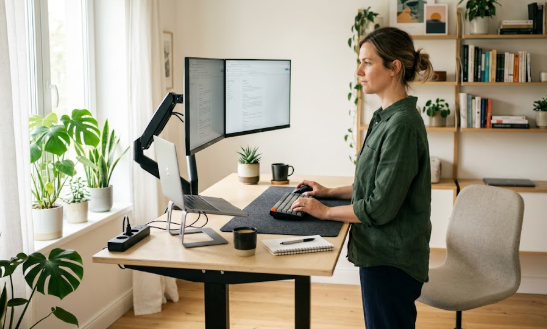
If your lower back tightens up halfway through the workday, the problem may not be your chair at all. It may be that you are not moving. Sitting still for hours steadily increases pressure on your lumbar spine and slows circulation to the muscles that hold you upright, and no chair on earth fixes that once stiffness sets in. A height-adjustable standing desk tackles the root cause by letting you switch between sitting and standing throughout the day, keeping your spine active instead of frozen in one position.
To be clear, a standing desk is not a cure, and standing still all day is no better than sitting still all day. The benefit comes from movement and variety. In this guide we cover the best standing desks for back pain in 2026 across every budget, explain exactly what matters when choosing one, and show you how to use it so the relief actually lasts. If you are building a full setup, it pairs naturally with the right seat from our roundup of the best ergonomic chairs for back pain.
How we chose these desks
We prioritised the features that matter most for back health rather than brand names or flashy add-ons. That means a wide height range that drops low enough for correct seated posture and rises high enough to stand without hunching or lifting your shoulders, genuine stability so the desk does not wobble while you type, smooth and quiet height adjustment, and memory presets that make switching positions effortless. We weighed build quality, warranty, weight capacity, and value, and cross-referenced manufacturer specifications with long-term owner feedback. Prices are approximate United States figures at the time of writing and change frequently, so confirm the current price before buying.
What makes a standing desk good for back pain
The single most important factor is height range. A desk that does not lower far enough forces your shoulders up and your wrists into awkward angles when seated, while one that does not rise high enough makes you hunch when standing. Taller users in particular should check the maximum height carefully, since many desks top out too low. Stability comes next: a wobbly desk forces small stabilising muscles to work constantly, which adds fatigue rather than relieving it, so dual-motor frames and a crossbar or four-leg design generally serve back-pain sufferers best, especially with heavy monitors.
Beyond that, look for memory presets so you can return to your ideal sitting and standing heights with one touch, because a desk that is annoying to adjust is one you will stop using. A spacious, durable desktop keeps your monitor at the right distance and reduces vibration, and good cable management keeps the surface uncluttered. The best desk for your back is ultimately the one you will actually use consistently, so ease of use beats spec-sheet bragging rights every time.
The best standing desks for back pain in 2026
Uplift V2 — Best overall
The Uplift V2 is the standing desk we recommend to most people, and it has earned that reputation through stability, longevity, and an enormous range of customisation. Its dual-motor frame is quiet and smooth, the weight capacity comfortably handles a multi-monitor setup, and the height range is generous enough to suit tall users who struggle with shorter desks. With the optional crossbar installed it is exceptionally rigid even at standing height. Uplift also offers more than twenty desktop materials, from bamboo to solid hardwood, so you can match it to your room, and the frame is backed by one of the longest warranties in the category. It costs a little more than budget rivals, but it is built to last a decade or more.
FlexiSpot E7 / E7 Pro — Best value
The FlexiSpot E7 delivers roughly ninety percent of the Uplift V2’s performance for noticeably less money, which makes it the smartest pick for budget-conscious buyers. It uses a sturdy dual-motor steel frame, offers a strong weight capacity, and includes a full-featured keypad with several memory presets and a sit-stand reminder built in at no extra cost. The upgraded E7 Pro adds even more capacity, a wider height range, and integrated cable management. You give up some of the Uplift’s premium stability and desktop variety, but you would not feel like you were settling. For a head-to-head, see our full FlexiSpot vs Uplift comparison.
Autonomous SmartDesk — Best smart mid-range option
The Autonomous SmartDesk is a popular choice for remote workers who want a reliable electric sit-stand desk at an accessible price, often bundled attractively with the brand’s ergonomic chairs. It offers programmable height presets, a quiet motor, and a clean modern look that suits a home office. It is a strong all-rounder for the average desk worker, and if you are comparing it directly against FlexiSpot’s flagship, our Autonomous SmartDesk vs FlexiSpot E7 breakdown goes deeper.
Desky Dual — Best for smart features and quiet operation
If you value technology and a clutter-free workspace, the Desky Dual stands out. Its dual motors are notably quiet, low enough that you can raise or lower the desk during a video call without it being picked up by your microphone, and cable management is engineered into the frame itself rather than bolted on afterwards. App-based sit-stand reminders nudge you to change positions, which is exactly the habit that helps your back. It is a refined, professional desk for people who want movement built into their routine.
VertDesk V3 — Best in the mid-premium bracket
For buyers willing to step up from entry-level, the VertDesk V3 sits in the sweet spot where quality jumps significantly. It offers excellent stability, a smooth and reliable lifting mechanism, and the kind of build that holds up to years of daily adjustment. It is a particularly good choice for anyone who found cheaper desks wobbly or short-lived and wants something more substantial without paying premium-tier prices.
A standing desk converter — Best for tight budgets and small spaces
If you are not ready to replace your existing desk, a sit-stand converter that sits on top of your current surface is a reasonable starting point. It raises your monitor and keyboard to standing height and can be removed when you want to sit. The trade-offs are real, though: converters tend to be less stable and offer less precise height adjustment than a full electric desk, which matters if you have ongoing back pain. Treat it as a low-cost trial rather than a long-term solution.

At-a-glance comparison
The table below summarises the picks above. Prices are approximate United States figures and can change, so always confirm current pricing before buying.
| Desk | Best for | Approx. price (frame/desk) | Standout strength |
|---|---|---|---|
| Uplift V2 | Overall & tall users | ~$599+ | Stability, warranty, desktop choice |
| FlexiSpot E7 / E7 Pro | Value | ~$479 – $580 | Full-featured keypad included |
| Autonomous SmartDesk | Smart mid-range | ~$399 – $499 | Bundles & clean design |
| Desky Dual | Smart features | ~$600 | Quiet motors, built-in cable management |
| VertDesk V3 | Mid-premium | ~$600 – $700 | Rigid, long-lasting build |
| Sit-stand converter | Budget / small spaces | ~$120 – $300 | No need to replace your desk |
How to use a standing desk to actually relieve back pain
Buying the desk is only half the job; using it correctly is what protects your spine. Set the seated height so your elbows rest at roughly ninety degrees and your wrists stay straight, with the top of your monitor at about eye level. When standing, raise the desk to the same elbow position and check that you are not shrugging your shoulders or leaning on the surface. The goal is to alternate, not to stand all day. A common starting rhythm is to switch positions every thirty to sixty minutes, and an anti-fatigue mat makes the standing intervals far more comfortable, which is why we cover the best standing desk mats for back pain separately.
Movement is the active ingredient. Shift your weight, take short walks, and add a few gentle stretches between sessions; our guide to back pain exercises for remote workers has simple routines you can do at your desk. If you want to understand the evidence behind alternating positions, our standing vs sitting at work review summarises what the research actually shows.
Frequently asked questions
Can a standing desk really help with back pain?
It can help indirectly, by making it easy to move and change positions throughout the day, which reduces the sustained pressure on your lower spine that builds up during long periods of sitting. Research on sit-stand desks has linked their use to reductions in musculoskeletal discomfort. However, the benefit comes from alternating and moving, not from standing still for hours, and a desk is one tool within a broader healthy-workspace routine rather than a medical treatment.
How long should I stand each day?
There is no single perfect number, but many people do well alternating roughly every thirty to sixty minutes rather than standing for long stretches. Start with shorter standing intervals and build up gradually as your body adapts, and always prioritise comfort over hitting a target. Standing until your feet or back ache defeats the purpose.
Are cheap standing desks worth it?
The biggest quality jump is from entry-level to mid-range. Very cheap desks often wobble at standing height and use weaker electronics, which can make you use them less. A mid-range dual-motor desk in the roughly $480 to $700 range typically offers far better stability, warranty, and longevity, and it is the bracket most worth targeting for daily use.
Should I get a full electric desk or a converter?
A full electric desk offers better stability, a wider and more precise height range, and a cleaner setup, which makes it the better long-term choice for ongoing back pain. A converter is a sensible low-cost way to test whether standing helps you before committing, or a practical option if your space is tight, but it is generally a stepping stone rather than a destination.
The bottom line
For most remote and office workers, the Uplift V2 is the best standing desk for back pain in 2026 thanks to its stability, warranty, and height range, while the FlexiSpot E7 is the smarter buy for tighter budgets. Whatever you choose, remember that the desk only works if you use it: alternate between sitting and standing, keep moving, and set both heights correctly. You can check full specifications on the official Uplift Desk site and the official FlexiSpot site. To finish the workspace, run through our home office ergonomic setup guide.
Affiliate disclosure: This article contains affiliate links. If you buy a product through one of them, we may earn a small commission at no extra cost to you. This never influences which products we recommend.
Medical disclaimer: We are not doctors or physiotherapists, and this article is for general informational purposes only. It is not medical advice and should not replace consultation with a qualified healthcare professional. If you have persistent, severe, or worsening back pain, please seek advice from a licensed medical provider.